
Choosing the right booklet size affects more than how a printed booklet looks. It influences readability, page layout, paper usage, printing costs, binding options, and how easily the finished booklet fits into an envelope, folder, or product package.
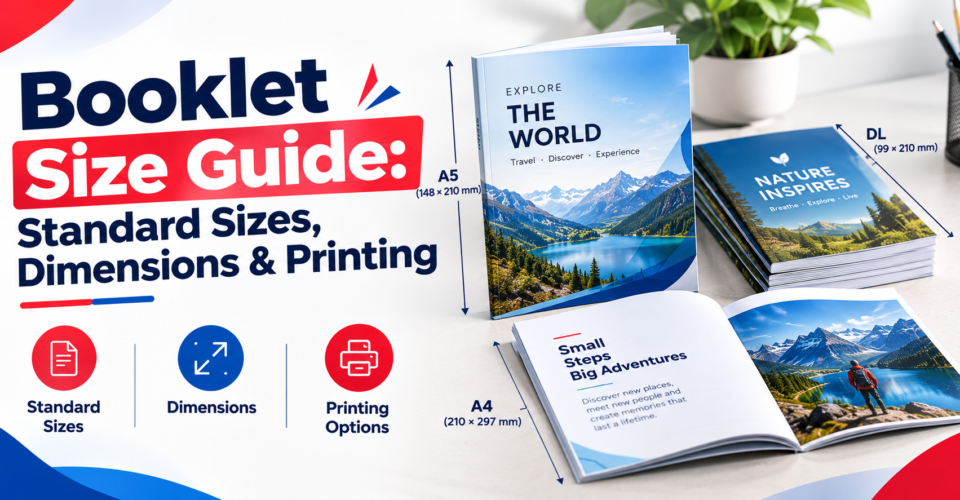
For businesses in the United States, two of the most practical starting points are 5.5 × 8.5 inches (half letter) for compact booklets and 8.5 × 11 inches (US Letter) for larger catalogs, reports, and manuals. International projects often use A5 (148 × 210 mm) or A4 (210 × 297 mm).
However, there is no single standard size for every booklet. The right dimensions depend on what the booklet contains, how customers will use it, how many pages it has, and which binding method the printer supports. Printing providers offer different standard and custom formats, so confirm the final specifications before preparing your artwork.
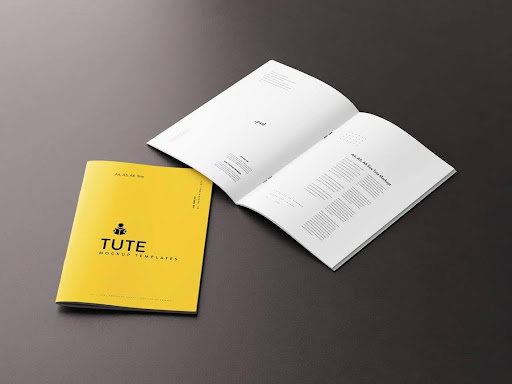
This guide compares common booklet dimensions in inches, millimeters, and centimeters, explains which sizes work best for different purposes, and shows how to prepare a file for printing.
Quick Answer: What Is the Standard Booklet Size?
The standard booklet size depends on the market and intended use. In the United States, 5.5 × 8.5 inches is a common compact format, while 8.5 × 11 inches is a widely used larger format for business and informational booklets. Internationally, A5 (148 × 210 mm) and A4 (210 × 297 mm) are common choices.
Here are the dimensions to know:
- Half letter: 5.5 × 8.5 inches (140 × 216 mm) — event programs, handbooks, and compact guides.
- US Letter: 8.5 × 11 inches (216 × 279 mm) — catalogs, reports, and training materials.
- A5: 5.83 × 8.27 inches (148 × 210 mm) — menus, programs, and portable guides.
- A4: 8.27 × 11.69 inches (210 × 297 mm) — manuals, catalogs, and detailed reports.
- A6: 4.13 × 5.83 inches (105 × 148 mm) — pocket guides and small instruction booklets.
- 6 × 9 inches: 152 × 229 mm — book-style publications, journals, and handbooks.
These are finished page dimensions, not necessarily the dimensions of the flat paper sheet used during printing. Your printer may also require additional bleed outside the finished trim size.
Standard Booklet Sizes Chart
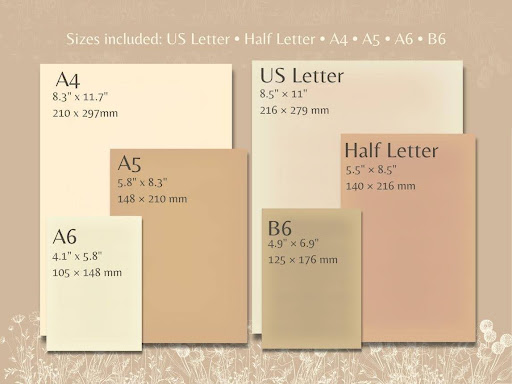
The following chart compares common booklet sizes and their typical uses. These are useful starting points, but actual availability depends on the printing provider and binding method.
| Booklet size | Dimensions in inches | Dimensions in mm | Dimensions in cm | Common uses |
|---|---|---|---|---|
| Quarter letter | 4.25 × 5.5 | 108 × 140 | 10.8 × 14.0 | Pocket guides, short instructions |
| Half letter | 5.5 × 8.5 | 140 × 216 | 14.0 × 21.6 | Event programs, menus, compact guides |
| US Letter | 8.5 × 11 | 216 × 279 | 21.6 × 27.9 | Business reports, catalogs, manuals |
| 6 × 9 | 6 × 9 | 152 × 229 | 15.2 × 22.9 | Handbooks, journals, book-style guides |
| A4 | 8.27 × 11.69 | 210 × 297 | 21.0 × 29.7 | Detailed reports, manuals, catalogs |
| A5 | 5.83 × 8.27 | 148 × 210 | 14.8 × 21.0 | Menus, brochures, event programs |
| A6 | 4.13 × 5.83 | 105 × 148 | 10.5 × 14.8 | Pocket guides, product instructions |
| A7 | 2.91 × 4.13 | 74 × 105 | 7.4 × 10.5 | Mini guides and small inserts |
| 8.5 × 8.5 square | 8.5 × 8.5 | 216 × 216 | 21.6 × 21.6 | Lookbooks, visual portfolios |
| 11 × 11 square | 11 × 11 | 279 × 279 | 27.9 × 27.9 | Large visual presentations, portfolios |
| DL | 3.90 × 8.27 | 99 × 210 | 9.9 × 21.0 | Slim menus, price lists, short guides |
Measurements are rounded for convenient comparison. Verify the exact trim dimensions and available formats with your printer.
1. Half-Letter Booklet Size: 5.5 × 8.5 Inches
Saddle-Stitch Booklets | VistaPrint
The half-letter booklet size measures 5.5 inches wide × 8.5 inches high, approximately 140 × 216 mm or 14 × 21.6 cm. It is a practical choice for US businesses that need a portable printed guide without sacrificing too much room for text and images.
Because half letter is half the size of a US Letter sheet in one dimension, it can be produced by folding an 8.5 × 11-inch sheet in half. The actual production setup depends on the printer’s imposition and finishing process.
What is a half-letter booklet used for?
This format works well for:
- Event and conference programs
- Restaurant menus
- Church and wedding programs
- Employee handbooks
- Product guides and promotional booklets
- Short training materials
- Small business brochures
Why choose this booklet size?
Half letter is easy to hold, carry, and distribute. It also offers enough space for short paragraphs, product images, headings, and contact details without feeling oversized.
For a small business distributing printed materials at trade shows, events, or customer appointments, half letter can be a useful balance between portability and readability.
Best for: Compact booklets that customers should be able to carry or store easily.
2. US Letter Booklet Size: 8.5 × 11 Inches
The US Letter booklet size measures 8.5 × 11 inches, approximately 216 × 279 mm or 21.6 × 27.9 cm. It is a familiar format for US businesses and provides more room for detailed content than half letter.
A finished 8.5 × 11-inch page can be produced from a larger sheet, commonly 11 × 17 inches folded in half for a suitable booklet layout. The final print setup depends on the equipment and finishing specifications.
What is an 8.5 × 11 booklet used for?
Common applications include:
- Product catalogs
- Annual reports
- Employee training manuals
- Educational workbooks
- Corporate presentations
- Technical guides
- Detailed product information booklets
When should you choose US Letter?
Choose this format when your booklet contains tables, product specifications, large photographs, charts, or detailed instructions. The extra space can make complex information easier to organize and read.
However, a larger page is not always better. If the booklet is intended for quick handouts or pocket storage, half letter may be easier to distribute.
Best for: Business publications that require space for detailed text, tables, and images.
3. A5 Booklet Size: 148 × 210 mm
The A5 booklet size measures 148 × 210 mm, or 14.8 × 21 cm, approximately 5.83 × 8.27 inches. It is half the size of an A4 sheet and is commonly used for portable publications in markets that follow ISO paper sizes.
What is A5 booklet size in inches?
An A5 page is approximately 5.83 inches wide × 8.27 inches high in portrait orientation.
Although A5 and US half letter are similar in size, they are not identical. A5 is slightly wider and shorter than half letter, which means artwork designed for one format may need resizing or layout adjustments for the other.
Common uses of A5 booklets
- Restaurant and café menus
- Event programs
- Product information guides
- Training handbooks
- Wedding programs
- Compact catalogs
- Informational brochures
A5 vs. half letter: Which should you choose?
Choose A5 when your project follows international paper standard A-series documents. Choose half letter when the booklet is primarily for the US market and you want a familiar US printing format.
Do not assume an A5 file will fit a half-letter print specification without changes. Even small differences in page proportions can affect margins, image cropping, and text placement.
Best for: Portable publications with a clean, compact layout, especially for international projects.
4. A4 Booklet Size: 210 × 297 mm
An A4 booklet measures 210 × 297 mm, or 21 × 29.7 cm, approximately 8.27 × 11.69 inches. It is a larger A-series format suited to publications that need detailed content or generous visual space.
A4 is often used for reports, instruction manuals, catalogs, and documents designed for international audiences.
When is A4 booklet size useful?
A4 can be a strong option for:
- Product catalogs with multiple specifications
- Technical manuals
- Educational materials
- Company reports
- Training guides
- Publications containing detailed diagrams
- International business documents
A4 vs. US Letter
A4 and US Letter are close in size but not interchangeable.
| Feature | A4 | US Letter |
|---|---|---|
| Width | 210 mm / 8.27 in | 216 mm / 8.5 in |
| Height | 297 mm / 11.69 in | 279 mm / 11 in |
| Shape | Narrower and taller | Wider and shorter |
| Common context | International paper standard | Common US office format |
If your audience is primarily in the United States, US Letter may make layout and document compatibility simpler. If your artwork or documentation is already set up in A4, keeping A4 may avoid unnecessary reflow.
Best for: Detailed catalogs, manuals, and reports with substantial text or imagery.
5. A6 Booklet Size: 105 × 148 mm
An A6 booklet measures 105 × 148 mm, or 10.5 × 14.8 cm, approximately 4.13 × 5.83 inches. It is half the size of A5 and is useful when a publication needs to be especially compact.
What is A6 booklet size used for?
A6 booklets are suitable for:
- Pocket reference guides
- Short instruction booklets
- Small event programs
- Recipe booklets
- Loyalty guides
- Product information inserts
- Care instructions packaged with products
What should you consider before choosing A6?
The smaller page size can reduce the amount of paper used per page, but it also leaves less space for text, diagrams, and photographs. If the booklet contains complex instructions, use a clear typeface, comfortable text size, and a simple page layout.
For an instruction guide that will be placed inside a retail package, measure the available space before finalizing the booklet dimensions. Consider the folded booklet’s overall thickness as well as its width and height.
Best for: Short, compact guides and instruction booklets that need to fit inside a product package.
6. Other Booklet Sizes Worth Considering
Not every project fits A4, A5, A6, or US Letter. Depending on the printing provider, other formats may be available.
Quarter-letter booklet: 4.25 × 5.5 inches
This small US format can suit compact promotional guides, pocket references, and short product inserts. It offers limited space, so it works best when the content is concise.
6 × 9-inch booklet
The 6 × 9-inch format is similar to common trade-book proportions. It is useful for handbooks, journals, guides, and publications where a more book-like shape is desirable.
Square booklets
Square booklets can work well for lookbooks, creative portfolios, photography, and visual product presentations. They offer a distinctive layout, although the production cost may differ from a standard rectangular size because of paper usage and finishing requirements.
DL booklet: 99 × 210 mm
DL is a narrow, tall format often used for price lists, short guides, and menu-style publications. Confirm the printer’s supported dimensions and binding options before designing in this format.
A7 booklet: 74 × 105 mm
A7 is a mini format for very short information pieces. Because the page is small, it is best for concise instructions, reference points, or simple information rather than long paragraphs.
Important: A printer’s available sizes may differ by binding method, paper stock, and production equipment. Treat these formats as options to discuss, not as a guarantee that every printer offers them.
7. How to Choose the Right Booklet Size
The right booklet size depends on the content, reader, distribution method, and budget. Rather than selecting dimensions based only on appearance, start with the purpose of the publication.
| Purpose | Suggested size | Why it works |
|---|---|---|
| Event or conference program | Half letter or A5 | Portable and easy to hold |
| Product catalog | US Letter or A4 | More room for specifications and images |
| Compact instruction guide | A6 or quarter letter | Fits smaller spaces |
| Training handbook | Half letter, A5, or 6 × 9 in | Balances readability and portability |
| Corporate report | US Letter or A4 | Accommodates detailed content |
| Restaurant menu | A5, half letter, or DL | Easy to handle and display |
| Visual portfolio | Square or large format | Gives images more prominence |
| Product packaging insert | A6, A7, or a custom size | Can be sized to fit the box |
| Pocket reference | A6 or quarter letter | Compact and convenient |
Consider these five factors
1. Amount of content
A booklet with tables, diagrams, and detailed product descriptions generally needs more page space than a short event program. Do not force a large amount of content into a small format if doing so will make the text difficult to read.
2. Reader experience
Think about where the reader will use the booklet. A person holding a menu at a restaurant may prefer a compact format, while someone studying a technical manual may need a larger page.
3. Distribution
Will the booklet be handed out at an event, mailed, displayed on a counter, or packed with a product? The distribution method may determine the most practical dimensions.
4. Printing and finishing
A size that uses a standard paper sheet efficiently may be more economical than a custom format. Binding options, page count, paper stock, and finishing can all affect the final quote.
5. Brand presentation
A larger or square booklet can create a different visual impression from a compact booklet. Choose a format that supports the brand’s intended presentation without making the piece inconvenient to handle.
8. Booklet Size in Inches, Millimeters, and Centimeters
When working with a designer or printer, dimensions may be requested in different units. Use the conversion table below to check common measurements.
| Measurement | Inches | Millimeters | Centimeters |
|---|---|---|---|
| 4.25 × 5.5 in | 4.25 × 5.5 | 108 × 140 | 10.8 × 14.0 |
| 5.5 × 8.5 in | 5.5 × 8.5 | 140 × 216 | 14.0 × 21.6 |
| 6 × 9 in | 6 × 9 | 152 × 229 | 15.2 × 22.9 |
| 8.5 × 11 in | 8.5 × 11 | 216 × 279 | 21.6 × 27.9 |
| A6 | 4.13 × 5.83 | 105 × 148 | 10.5 × 14.8 |
| A5 | 5.83 × 8.27 | 148 × 210 | 14.8 × 21.0 |
| A4 | 8.27 × 11.69 | 210 × 297 | 21.0 × 29.7 |
| A7 | 2.91 × 4.13 | 74 × 105 | 7.4 × 10.5 |
Inch measurements for A-series paper are rounded conversions from metric dimensions.
How do you convert booklet dimensions?
To convert inches to millimeters, multiply the inch measurement by 25.4.
For example:
- 5.5 inches × 25.4 = 139.7 mm
- 8.5 inches × 25.4 = 215.9 mm
Rounded to whole millimeters, a 5.5 × 8.5-inch booklet is approximately 140 × 216 mm.
To convert millimeters to centimeters, divide each measurement by 10. For example, 148 × 210 mm becomes 14.8 × 21 cm.
Always use the exact specification requested by the printer when preparing artwork. Rounded measurements are useful for comparisons, but the production file should match the confirmed finished size.
9. How Booklet Size Affects Page Layout and Readability
The page dimensions influence how much content can fit comfortably on each page. However, the usable area is smaller than the full page because margins, binding, and finishing all need space.
A larger page may accommodate wider tables and bigger images. A smaller page may make the booklet more portable but require shorter paragraphs, fewer columns, or additional pages.
Tips for designing a readable booklet
- Use a consistent grid and margin system.
- Keep body text large enough for the intended audience.
- Avoid placing important text too close to the trimmed edges.
- Allow additional clearance near the binding edge.
- Use high-resolution images at their final placed size.
- Check tables and diagrams at actual print size, not only on a large monitor.
- Preview both single pages and the finished booklet as a reader would see it.
If your booklet contains product specifications, technical instructions, or comparison tables, prioritize legibility over fitting every detail onto fewer pages.
10. How Page Count and Binding Affect Booklet Size
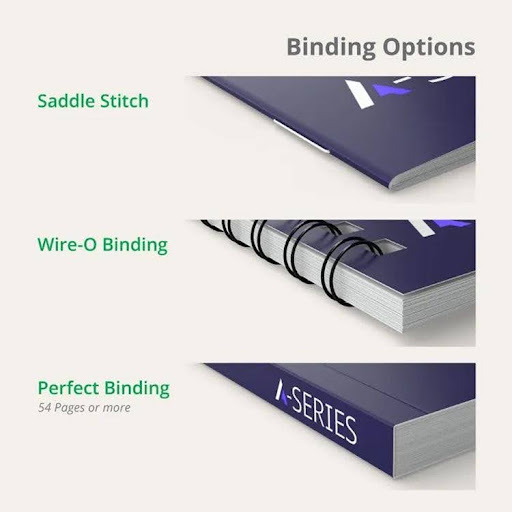
Booklet size and page count should be considered together because the binding method influences the finished product and the way the pages are assembled.
Saddle-stitch binding
Saddle stitching uses staples through the folded center of a booklet. It is commonly used for event programs, menus, short catalogs, and promotional publications.
Because each folded sheet contributes four pages, saddle-stitched booklets are typically arranged in multiples of four, including the cover. For example, a 16-page booklet contains 16 pages in total, not 16 interior pages plus the cover.
The maximum practical page count depends on paper thickness, stock, and the printer’s equipment. Ask the printer to confirm the permitted range for your chosen size.
Perfect binding
Perfect binding attaches the pages to a glued spine. It is useful for thicker catalogs, manuals, and publications that need a book-like appearance.
The spine width depends on factors such as page count and paper thickness. You should not finalize the cover artwork until the printer has confirmed the spine measurement.
Wire-O or spiral binding
Wire-O and spiral bindings are practical for workbooks, reference guides, manuals, and materials that need to open easily on a desk. These methods can be useful when readers need to keep the pages open while following instructions.
| Binding method | Common applications | Key sizing consideration |
|---|---|---|
| Saddle stitch | Event programs, short guides, menus | Page count and folded-sheet layout |
| Perfect binding | Thick catalogs, manuals, books | Spine width and page block thickness |
| Wire-O | Workbooks, training guides | Space needed for punching and binding |
| Spiral binding | Reference guides, instruction materials | Binding clearance and ability to turn pages |
The availability of each binding method varies by supplier. Confirm both the final trim size and the page-count limits before creating the print file.
11. Bleed, Safe Margins, and Print-Ready Files
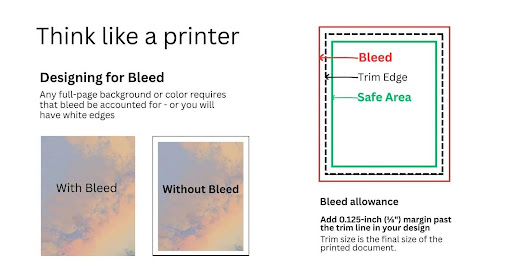
Correct dimensions are only one part of preparing a booklet for printing. Your artwork also needs suitable bleed, safe margins, image resolution, and export settings.
Bleed is the area of artwork extending beyond the final trim line. It helps prevent unwanted white edges if the printed sheet shifts slightly during cutting.
A commonly requested bleed is 0.125 inch (⅛ inch) on each edge, or approximately 3.175 mm. Some printers use 3 mm. Follow the exact specification supplied by your printer rather than assuming all providers use the same setting.
Example: Half-letter booklet with bleed
For a finished page measuring 5.5 × 8.5 inches, adding 0.125 inch of bleed on every side produces a page artwork area of:
- Finished trim: 5.5 × 8.5 inches
- Bleed: 0.125 inch on each edge
- Artwork size including bleed: 5.75 × 8.75 inches
This is the artwork area for an individual page, not necessarily the size of the complete imposed printing sheet.
Print-ready booklet checklist
Before submitting your file, check the following:
- Document pages match the printer’s confirmed finished dimensions.
- Bleed is added where images or colors extend to the edge.
- Text and logos sit safely inside the trim.
- Additional binding clearance is allowed where required.
- Images have adequate resolution at their final printed size.
- Fonts are embedded or prepared according to the printer’s instructions.
- Color settings match the print provider’s requirements.
- Page count and cover setup are correct.
- Pages are supplied in the format requested by the printer.
- A proof is reviewed before the full production run.
Should you send individual pages or spreads?
For many commercial booklet jobs, printers request individual pages in reading order and handle imposition themselves. Imposition is the process of arranging pages on larger sheets so that they appear in the correct order after printing, folding, and trimming.
Do not create printer spreads unless your printer specifically requests them. Confirm the preferred PDF setup before exporting your final artwork.
12. Booklet Sizes for Product Packaging
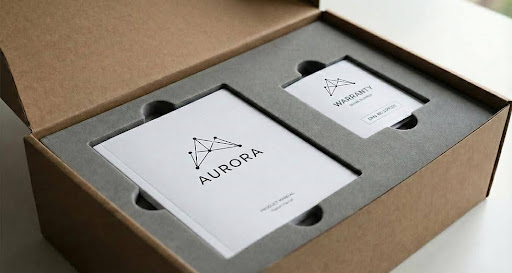
Booklets are not used only for marketing and business publications. Many products include small printed guides to explain assembly, care, product features, warranty information, or safe use.
For these applications, the available space inside the packaging should help determine the booklet size.
For example:
- A small item may need a compact A7, A6, or custom instruction booklet.
- A cosmetics or skincare product may use a small care guide or product information insert.
- A retail product may include a folded guide or multi-page booklet.
- A larger boxed product may have room for a more detailed manual.
Measure the internal space available for the booklet, not just the outside of the box. Account for inserts, product trays, protective materials, and the thickness of the folded booklet.
If your publication will be packed inside a custom box, explore Bluebird Packaging’s options for custom retail packaging and custom rigid boxes. These are packaging options to consider for a product that needs a coordinated presentation; confirm the booklet’s fit and the required internal dimensions before ordering.
Other useful resources include this guide to product packaging and information on packaging inserts, which can help you plan how printed materials sit alongside the product.
13. How to Prepare a Booklet for Printing: Step by Step
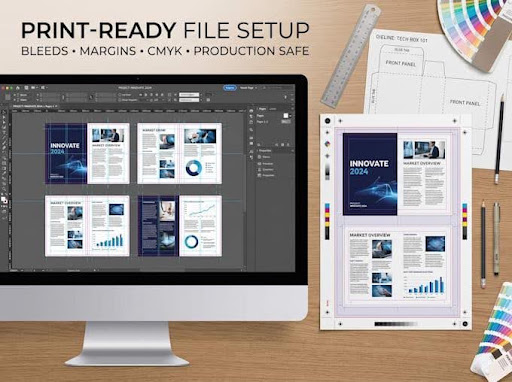
Follow this process to reduce sizing errors and avoid last-minute artwork changes.
Step 1: Define the booklet’s purpose
Decide whether the booklet is a catalog, event program, menu, manual, product guide, or promotional publication. Its purpose determines how much space you need.
Step 2: Choose the finished size
Select a suitable standard format such as half letter, US Letter, A5, A4, or A6. If you need a custom size, ask the printer whether it supports that trim and which binding options are available.
Step 3: Confirm page count and binding
Estimate how many pages the content requires, including the cover. Then check whether saddle stitch, perfect binding, Wire-O, or spiral binding is appropriate.
Step 4: Set up the document
Create the document at the finished page size, not the flat sheet size. Add bleed and safe margins according to the printer’s specifications.
Step 5: Prepare the artwork
Check images, text, tables, colors, and logos at the final size. Avoid making type too small just to reduce the number of pages.
Step 6: Export the file
Export the print-ready PDF using the requested color settings, bleed, page order, and font handling. Ask the printer whether it needs a separate cover file or a specific PDF standard.
Step 7: Review a proof
Review the proof for cropping, page order, color, text placement, and binding clearance. For important campaigns or large print runs, a physical sample may help reveal issues that are harder to spot on screen.
Step 8: Check how it will be delivered or packaged
If the booklet will be mailed, placed in a folder, or inserted into a product box, confirm the finished dimensions and thickness against the available space.
14. Common Booklet Size Mistakes to Avoid
Small setup errors can create unnecessary rework, so check the following before sending your artwork to print.
Mistake 1: Confusing A5 with half letter
A5 and half letter are similar but have different proportions. Reusing the same artwork without checking the page dimensions may shift the layout or crop images.
Fix: Set the exact finished size requested by the printer.
Mistake 2: Designing at the flat sheet size
The flat sheet used to produce a folded booklet is not the same as the finished page. Designing an A5 booklet on an A4 page without the correct layout settings can cause confusion during export.
Fix: Create individual pages at the finished trim size unless the printer provides a different template.
Mistake 3: Forgetting bleed
If background colors or images stop exactly at the trim edge, small cutting variations may expose a white border.
Fix: Extend edge-to-edge artwork into the specified bleed area.
Mistake 4: Placing text too close to the binding
Text positioned too close to the fold or spine can be difficult to read or may appear crowded.
Fix: Use the printer’s safe-margin guidance and allow extra clearance for binding.
Mistake 5: Choosing a size before reviewing the content
A small format can become cramped when it contains long descriptions, technical tables, or detailed illustrations.
Fix: Match the page size to the amount and type of content.
Mistake 6: Ignoring the packaging or envelope
A booklet may look suitable on screen but not fit the intended package or mailing envelope.
Fix: Confirm the internal box dimensions or mailing requirements before finalizing the design.
15. Frequently Asked Questions About Booklet Size
What is the standard booklet size?
In the United States, 5.5 × 8.5 inches (half letter) is a common compact booklet size, while 8.5 × 11 inches (US Letter) is a common larger format. A5 and A4 are common international formats. The best choice depends on the content and printer.
What is the most common booklet size for business use?
Half letter is useful for compact business booklets, event programs, and menus. US Letter is often more suitable for detailed reports, manuals, and catalogs that need additional space for tables and images.
What is A5 booklet size in inches?
A5 measures approximately 5.83 × 8.27 inches, or 148 × 210 mm. It is slightly wider and shorter than the US half-letter size of 5.5 × 8.5 inches.
What is A6 booklet size in inches?
A6 measures approximately 4.13 × 5.83 inches, or 105 × 148 mm. It is useful for compact instruction booklets, pocket guides, and small product inserts.
Is A4 the same as US Letter?
No. A4 measures 210 × 297 mm, while US Letter measures 216 × 279 mm. A4 is narrower and taller, so a design may need adjustments when moving between the two formats.
How do I choose the right booklet size?
Start with the booklet’s purpose, amount of content, intended audience, page count, binding, distribution method, and budget. Choose a standard size when it suits the project, and confirm the final dimensions with your printer.
How much bleed does a booklet need?
A commonly requested bleed is 0.125 inch (⅛ inch) on each edge, approximately 3.175 mm. Some printers specify 3 mm or another value, so always follow the production requirements for your particular job.
What resolution should a booklet use for printing?
A common guideline for raster images is 300 DPI at the final printed size. The correct settings depend on the printing method and provider. Vector artwork and text should remain in suitable vector or text formats where possible.
Do saddle-stitched booklets need a page count divisible by four?
Generally, yes. Each folded sheet creates four pages, so saddle-stitched booklets are normally prepared in multiples of four, including the cover. Confirm the printer’s requirements before submitting the file.
Can I order a custom booklet size?
Many print providers offer custom trim sizes, but the supported dimensions, binding methods, and costs vary. Request confirmation of the exact size before designing the final file.
What booklet size fits inside a product box?
The booklet must fit within the usable internal space after accounting for the product, inserts, and protective materials. Small booklets such as A6 or A7 may work for compact products, but measuring the actual available space is essential.
Conclusion: Choose a Booklet Size That Fits the Content and the Purpose
The best booklet size is the one that gives your content enough room, suits the way readers will use it, and works with your printing and binding requirements.
For US projects, half letter (5.5 × 8.5 inches) is a practical choice for compact publications, while US Letter (8.5 × 11 inches) offers more space for detailed content. A5, A4, and A6 are useful alternatives for international publications, manuals, and small product guides.
Before sending your design to print, confirm the finished dimensions, page count, binding, bleed, safe margins, and PDF requirements. If the booklet will be included with a product, check that it fits the packaging along with any inserts and protective materials.
For a project that includes printed information inside a product box, explore Bluebird Packaging’s custom packaging options and request a quote to discuss the box structure and dimensions that suit your product.