
A bi fold brochure is a single sheet of paper folded once to create four printable panels. It is commonly used for business marketing, product information, restaurant menus, service guides, event programs and promotional materials.
The right brochure size depends on how much information you need to present, how customers will use it, and whether you plan to distribute it by hand, mail it or include it with a product.
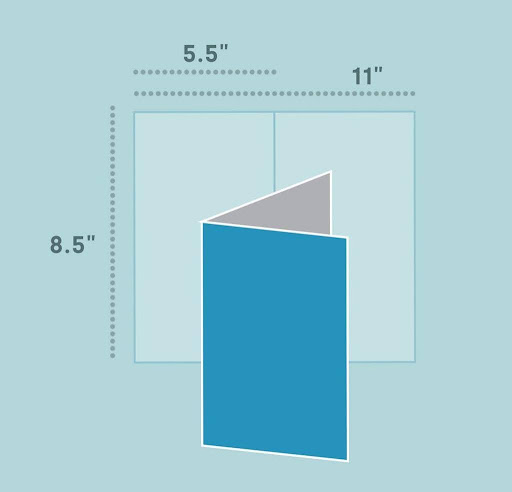
Quick answer: A common US bi-fold brochure uses an 11 × 8.5-inch sheet and folds to 5.5 × 8.5 inches. Each panel is 5.5 × 8.5 inches. In metric formats, an A4 sheet measuring 297 × 210 mm can be folded to approximately A5 size, 210 × 148 mm. For commercial printing, confirm the printer’s required orientation, trim size and bleed before preparing the final artwork.
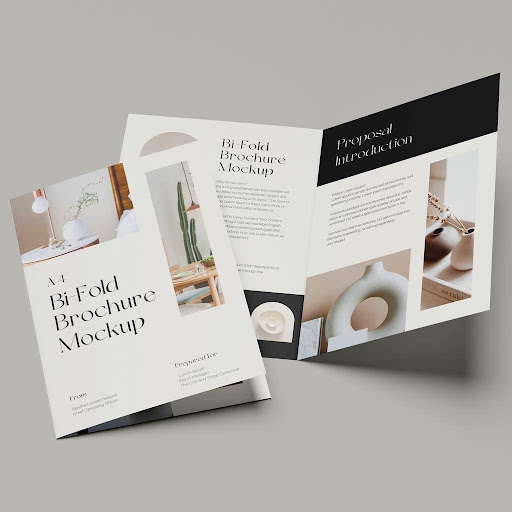
This guide explains bi-fold brochure dimensions, panel order, layout ideas, paper choices, print specifications, folding methods, costs and common mistakes so you can plan a professional brochure with fewer production issues.
Bi Fold Brochure Specifications at a Glance
| Feature | Details |
|---|---|
| Number of folds | One center fold |
| Printable panels | Four |
| Common US flat size | 11 × 8.5 inches |
| Common US folded size | 5.5 × 8.5 inches |
| Metric example | A4 folded to A5 |
| Common name | Half-fold or single-fold brochure |
| Print sides | Usually both sides |
| Typical file preparation | Flat trim size plus printer-specified bleed |
| Common resolution | 300 DPI for raster images at final print size |
| Common color mode | CMYK, subject to printer requirements |
| Typical uses | Menus, company profiles, product guides, event materials and marketing handouts |
These are common specifications, not universal requirements. A print provider may offer other dimensions, paper stocks, folding directions and finishing options.
What Is a Bi Fold Brochure?
A bi fold brochure is made by folding one sheet of paper once, usually down the center. The fold divides the sheet into two halves, and printing on both sides gives you four content panels.
It is also called a half fold brochure, half-fold pamphlet or single-fold brochure.
Imagine opening a small book: the outside contains the front cover and back panel, while the inside reveals two panels that can work separately or as one continuous spread.
The four panels explained
- Front cover: Introduces the business, product, service or subject. It usually contains a headline and one strong visual.
- Back panel: Holds contact details, website, address, QR code or a clear call to action.
- Inside-left panel: Introduces the topic, explains a customer problem or presents a short overview.
- Inside-right panel: Gives the main details, such as product features, services, benefits, pricing or next steps.
A bi-fold is useful when the content needs more space than a flyer but does not require a multi-page booklet.
When should you use a bi-fold brochure?
Consider this format when you need to:
- Present a company’s services in a simple, organized way.
- Display product benefits with large images and readable text.
- Create a restaurant menu with separate sections.
- Share information about a conference, event or property.
- Include care instructions or a brand story with a physical product.
- Produce a handout that opens like a small book rather than a narrow rack brochure.
For product inserts, coordinate the folded dimensions with the box’s usable interior space. A brochure should fit flat without curling, bending or pressing against the product.
Bi Fold Brochure Sizes and Dimensions
Choosing the right size is one of the first decisions in a bi-fold brochure project. The flat size describes the sheet before folding; the folded size describes the finished brochure after folding.
For a standard center fold, the sheet is divided into two equal halves. If you start with a flat sheet measuring 11 × 8.5 inches in landscape orientation, the finished brochure measures 5.5 × 8.5 inches.
Common US bi-fold brochure sizes
| Flat sheet size | Folded size | Suitable applications |
|---|---|---|
| 11 × 8.5 in | 5.5 × 8.5 in | Company brochures, menus, service guides |
| 17 × 11 in | 8.5 × 11 in | Product presentations, detailed catalogs, reports |
| 14 × 8.5 in | 7 × 8.5 in | Longer menus and information sheets |
| 12 × 9 in | 6 × 9 in | Premium handouts and event guides |
| 9 × 6 in | 4.5 × 6 in | Compact brochures and promotional inserts |
| 8.5 × 5.5 in | 4.25 × 5.5 in | Small product guides and compact inserts |
These are useful size examples, not a guarantee that every printer offers each option. Confirm the exact dimensions and orientation with your chosen provider.
Bi-fold brochure dimensions in inches
When a printer lists a brochure as 11 × 8.5 inches, check whether the measurements refer to the flat sheet or the finished piece.
For the common US Letter example:
- Flat width: 11 inches
- Flat height: 8.5 inches
- Fold line: 5.5 inches from either side along the 11-inch dimension
- Finished width: 5.5 inches
- Finished height: 8.5 inches
- Panel size: 5.5 × 8.5 inches per panel
The dimensions change if you use a different sheet size or fold the brochure along the other axis.
Bi-fold brochure dimensions in millimeters
Metric paper sizes are often used outside the United States. The A-series follows a consistent system in which each size is approximately half the area of the next larger size.
| Flat paper size | Approximate folded size | Common use |
|---|---|---|
| A4: 297 × 210 mm | A5: 210 × 148 mm | Business information and service brochures |
| A3: 420 × 297 mm | A4: 297 × 210 mm | Larger product presentations and catalogs |
| A5: 210 × 148 mm | A6: 148 × 105 mm | Compact brochures and inserts |
The table shows nominal dimensions. Actual orientation and which side is halved depend on how the sheet is folded.
US Letter vs. A4: What is the difference?
US Letter measures 8.5 × 11 inches, or approximately 216 × 279 mm. A4 measures 210 × 297 mm. They are close in size but are not identical.
This difference matters when transferring a design between paper formats. An A4 file placed directly into a US Letter print setup may need resizing or layout adjustments. Always set the document to the printer’s exact trim size rather than relying on an automatic fit-to-page setting.
Portrait vs. landscape bi-fold brochures
Portrait-style finished brochure: The closed piece is taller than it is wide, like a small book. This is common for service guides, company profiles and menus.
Landscape-style finished brochure: The closed piece is wider than it is tall. It works well for panoramic images, timelines, diagrams or side-by-side comparisons.
Before designing, decide how the brochure will open and which edge will become the spine. This helps you place the cover, headings and images correctly.
How to Set Up a Bi Fold Brochure for Printing
A brochure can look correct on a screen and still print incorrectly if the file uses the wrong dimensions, lacks bleed or places important text too close to the fold.
A reliable print setup starts with the flat trim size and adds the printer’s required bleed beyond the edges.
What is bleed in brochure printing?
Bleed is extra artwork that extends beyond the final trim edge. It allows the printer to cut the sheet without leaving thin white edges when the cut varies slightly.
A common commercial-printing specification is 0.125 inch (3.175 mm) of bleed on each outside edge, but you should follow the provider’s template.
For an 11 × 8.5-inch flat brochure, adding 0.125 inch to all four edges creates an overall artwork area of 11.25 × 8.75 inches.
Remember:
- Bleed extends beyond the outside trim edges.
- The center fold is a guide, not an extra trim edge.
- Background colors and images that touch the final edge should extend into the bleed.
- Important text and logos should remain inside the safe area.
What is a safe margin?
The safe margin is the area inside the trim where important content should remain. It reduces the risk of text or logos appearing too close to a cut edge.
A margin of 0.125 inch is a common starting point, but use the printer’s template if it specifies a larger safe area. Keep critical content farther from the center fold so it does not look cramped or become difficult to read.
Print-file setup checklist
| Setting | Recommended starting point | Why it matters |
|---|---|---|
| Document size | Exact flat trim dimensions | Keeps panels and fold aligned |
| Bleed | Commonly 0.125 in / 3.175 mm | Helps prevent white edges |
| Safe margin | At least the printer’s specified margin | Protects important content |
| Fold guide | Exact midpoint of the flat sheet | Keeps the panels balanced |
| Image resolution | 300 DPI at final size for raster images | Helps maintain print clarity |
| Color mode | CMYK if required by the printer | Supports the intended print workflow |
| Fonts | Embed fonts or follow the printer’s font instructions | Reduces font substitution issues |
| Export | Print-ready PDF using provider settings | Preserves layout and print details |
These are starting recommendations, not substitutes for a printer’s production specifications.
How many pixels does a bi-fold brochure need?
Pixel dimensions depend on the physical page size and the output resolution. At 300 DPI, an 11 × 8.5-inch trim-size sheet corresponds to 3,300 × 2,550 pixels before adding bleed.
For a file that includes 0.125-inch bleed on every edge, the overall size is 11.25 × 8.75 inches, or 3,375 × 2,625 pixels at 300 DPI.
This calculation applies to raster artwork. Vector text, logos and shapes can remain sharp when exported correctly in a print-ready PDF.
How to prepare the file step by step
- Confirm the printer’s flat trim size and finished folded dimensions.
- Create the document at the flat size, not the closed brochure size.
- Add the required bleed and safe margins.
- Place a fold guide at the exact center of the sheet.
- Design the outside and inside spreads with the correct panel order.
- Keep essential text, faces and logos away from the fold.
- Check image resolution and color settings.
- Export using the printer’s requested PDF settings.
- Review a digital proof and, where practical, a folded physical proof before approving the full run.
For artwork workflows, Bluebird Packaging’s guides to packaging artwork and packaging design can also provide useful background on preparing branded artwork for packaging projects.
Bi Fold Brochure Layout: Correct Panel Order
The most common layout mistake is placing the front cover on the wrong half of the outside spread.
For a conventional book-style bi-fold, when the outside spread is laid flat in its intended reading orientation, the back panel is on the left and the front cover is on the right. The inside spread contains the two inside panels.
Your printer’s template should always take priority if the project uses a nonstandard orientation or folding direction.
Panel layout reference
| Panel | Position in the flat artwork | Recommended content |
|---|---|---|
| Front cover | Right half of outside spread | Brand, headline, main image |
| Back panel | Left half of outside spread | Contact details, website, QR code, CTA |
| Inside-left | Left half of inside spread | Introduction, overview, customer problem |
| Inside-right | Right half of inside spread | Main details, products, benefits, next steps |
What should go on the front cover?
The front cover should tell readers what the brochure is about within seconds. Use a clear headline, recognizable branding and a relevant image. Avoid trying to fit every product or service on the cover.
For example, a company brochure might use the headline “Packaging Solutions for Growing Brands” followed by one concise supporting line. A restaurant menu might feature the restaurant’s name, food photography and a short description of its offering.
What should go on the inside panels?
The inside spread is where you explain the offer. Give each panel a clear purpose instead of treating the brochure as one long block of text.
A practical order is:
- Inside-left: Introduce the business or explain the customer’s need.
- Inside-right: Present the main products, services, benefits or pricing.
- Across both panels: Use a wide photo, comparison graphic or process illustration when the content genuinely benefits from spanning the fold.
Do not place small text, a face or a key product detail directly over the crease. A visually continuous background can cross the fold, but essential information should remain comfortably on one side.
What should go on the back panel?
The back panel is a good place for the information readers need after reviewing the brochure:
- Website and contact details
- Physical location or service area, if relevant
- QR code or booking link
- Social media details, where useful
- A clear call to action
Use a QR code only if it leads to a useful destination, such as a product page, booking form or downloadable catalog. Make sure it is large enough to scan and test it from a printed proof.
Bi Fold Brochure Design Ideas for Different Businesses
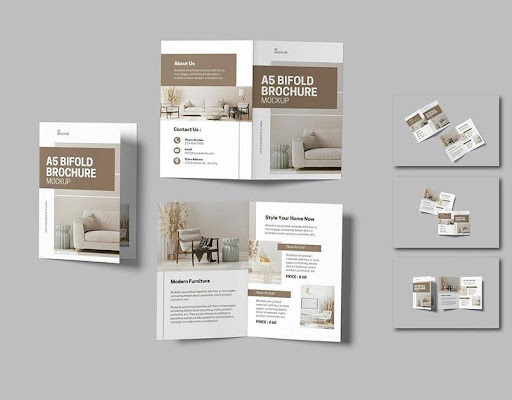
The best bi-fold brochure design depends on the purpose of the document. A brochure intended to generate sales leads needs a different structure from a menu, event guide or product insert.
1. Company profile brochure
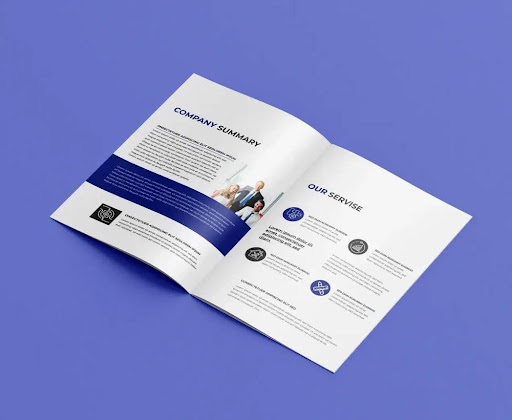
Use the cover for the company name and main promise. Inside, introduce the business, its services and its differentiators. Put contact details and a next step on the back.
2. Restaurant or café menu
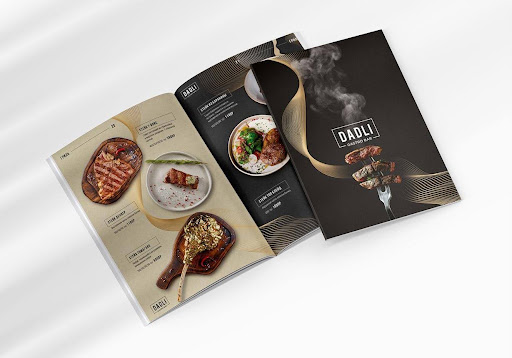
Organize dishes into clear categories. Use readable type, consistent prices and enough spacing to make scanning easy. Avoid letting decorative elements compete with the menu.
3. Product or service guide
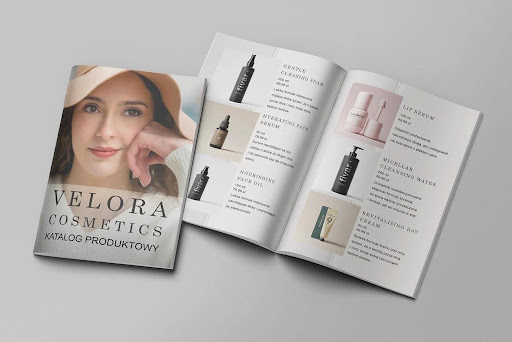
Show product images, short descriptions and the most useful benefits. Keep specifications easy to compare, and direct readers to a website for full details.
4. Real estate brochure
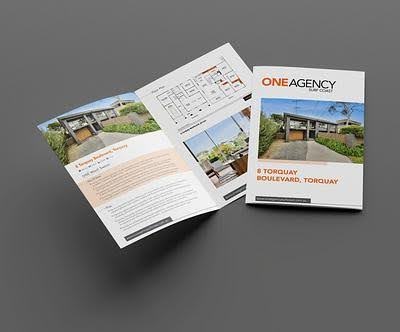
Feature the property on the cover. Use the inside for images, highlights, key facts or a floor plan, and the back for the agent’s contact details.
5. Event program
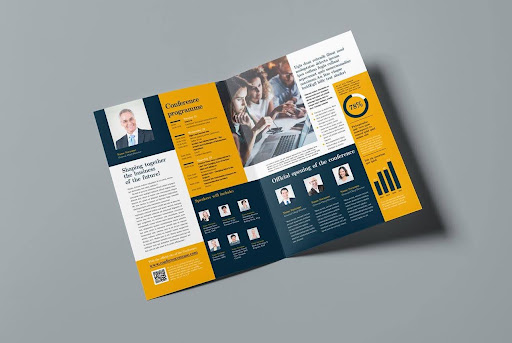
Use a clear title and event date on the cover, a schedule and speaker details inside, and venue or contact information on the back.
Design principles that improve readability
- One main message: The reader should quickly understand the brochure’s purpose.
- Clear visual hierarchy: Use a strong headline, descriptive subheadings and short supporting text.
- Readable typography: Avoid overly small text, especially for menus, instructions or detailed specifications.
- Consistent branding: Use a controlled set of colors, typefaces and image styles.
- Intentional white space: Empty space helps readers distinguish sections and focus on important information.
- Useful calls to action: Tell readers what to do next rather than adding several competing requests.
- Print-aware artwork: Check the fold, margins, bleed and image quality before export.
For more ideas on visual consistency, see this guide to packaging design. If the brochure will accompany a product, its visual identity can also coordinate with custom printed packaging.
Bi Fold vs. Tri Fold Brochure: Which Is Better?
A bi-fold brochure has one fold and four panels. A tri-fold brochure typically has two folds and six panels. The right option depends on how much content you have and how readers should move through it.
| Feature | Bi-fold brochure | Tri-fold brochure |
|---|---|---|
| Number of folds | 1 | 2 |
| Number of panels | 4 | 6 |
| Panel width | Equal halves in a standard bi-fold | Often slightly adjusted so the inner panel tucks in |
| Reading experience | Opens like a book | Unfolds in stages |
| Inside layout | Offers a wide two-panel spread | Offers more separate sections |
| Good for | Company profiles, menus, product overviews | Rack brochures, step-by-step information, compact service lists |
| Layout considerations | Center fold and outside/inside spreads | Panel sequence and tuck-in panel dimensions |
When should you choose a bi-fold?
Choose a bi-fold when you need a larger cover, a spacious inside spread or a straightforward reading experience. It is particularly suitable for large images, short company profiles and product overviews.
When should you choose a tri-fold?
Choose a tri-fold when information can be separated into six smaller sections, or when the narrow, folded format is more convenient for distribution.
For a closer look at the alternative, read Bluebird Packaging’s related guide to tri-fold brochures. Confirm the exact available format and URL on your site before publishing if that slug differs from the live page.
Bi Fold Brochure Paper Types and Finishes
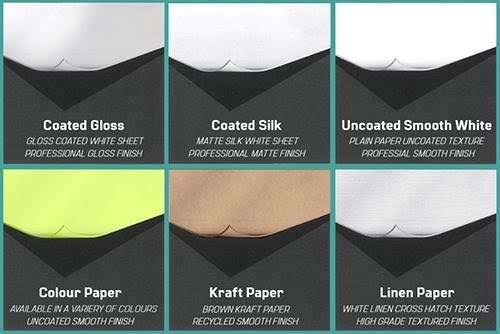
Paper affects the brochure’s feel, stiffness, print appearance, folding performance and overall cost. A suitable stock for a short-lived handout may not be ideal for a premium menu or a brochure that customers will keep.
Common paper choices
| Paper option | Appearance and feel | Suitable use |
|---|---|---|
| Uncoated text paper | Natural, less reflective and often easier to write on | Forms, programs, simple informational brochures |
| Gloss-coated paper | Smooth surface with vivid-looking images | Photo-led marketing and promotional materials |
| Matte-coated paper | Smooth surface with reduced glare | Professional brochures, service guides and product information |
| Heavier cover stock | More rigid and substantial | Premium handouts, menus and durable promotional pieces |
Paper weights such as 70 lb, 80 lb and 100 lb can refer to different paper grades and basis-weight systems. Do not compare the numbers alone without checking the stock type and the printer’s specification.
Gloss vs. matte
Gloss can make colorful product images and photography appear more vivid, but reflected light may make text harder to read under some conditions.
Matte offers a softer appearance with less glare. It can suit restrained designs, detailed text and professional company profiles.
Uncoated stock can be a good choice when people need to write on the brochure, although ink behavior depends on the paper and printing method.
Should you use thick paper for a bi-fold?
Heavier stock can feel more premium, but it also makes the fold more demanding. Ask the printer whether the stock needs scoring before folding, particularly when the paper is thick or the design has heavy ink coverage near the crease.
Scoring creates a controlled crease that can reduce cracking and help a thicker sheet fold neatly. The best approach depends on paper grain, stock thickness, coating and production equipment.
How to choose the right finish
Before selecting a coating or finish, ask:
- Will the brochure be handled frequently?
- Does it contain large photographs or mainly text?
- Does the audience need to write on it?
- Will the fold show dark, heavily printed areas?
- Is the brochure a short-term handout or a piece intended to last?
If the brochure is part of a wider brand presentation, align its colors and typography with the rest of the company’s marketing materials and product packaging.
How Much Does Bi Fold Brochure Printing Cost?
There is no single price for every bi-fold brochure. The cost depends on the finished dimensions, paper stock, quantity, color coverage, coating, scoring, turnaround and delivery requirements.
A basic brochure printed on standard stock may cost less per piece than a premium brochure with heavier paper, special finishes or complex production requirements.
Factors that affect the price
| Cost factor | How it affects the quote |
|---|---|
| Quantity | Larger runs may reduce the unit cost, depending on the printing method |
| Size | Larger sheets use more paper and may require different production settings |
| Paper weight | Heavier or specialty stocks can increase material and handling costs |
| Color and artwork | Full-color printing and heavy coverage can affect production costs |
| Coating or finish | Additional finishing adds material and production steps |
| Scoring and folding | Thick stock or special folds may require extra processing |
| Proofing | Physical proofs or additional revisions can add time and cost |
| Delivery | Packaging, shipping distance and rush delivery affect the final price |
How to request an accurate printing quote
When contacting a print provider, provide the flat size and folded size, the quantity, the paper type, whether both sides are printed, your finish preferences and the delivery deadline.
Also ask whether the quote includes file checking, folding, scoring, setup charges and shipping. Comparing quotes is easier when each provider prices the same specifications.
If the brochure is intended to go inside a product box, plan the brochure and box together. Bluebird Packaging offers custom packaging options, including custom retail boxes and custom rigid boxes. These links are useful for coordinating the packaging around your product; confirm the availability of any separate brochure-printing service directly with the provider.
How to Use a Bi Fold Brochure as a Product Insert
A bi-fold brochure can help a business provide care instructions, explain product benefits, introduce a brand or encourage customers to reorder. It is useful when a product needs more information than can comfortably fit on a small label or card.
Choose the insert dimensions carefully
Measure the usable inside dimensions of the box rather than relying only on the outside measurements. The finished folded brochure should fit with enough clearance to slide in and out without catching on the walls or bending at the corners.
For example, a 5.5 × 8.5-inch brochure may suit a larger mailer or product box, while a smaller folded format may be more appropriate for compact packaging. The correct choice depends on the actual interior dimensions and the space occupied by the product and protective materials.
You can use these related guides to plan the packaging around an insert:
- How to measure a box — check the inside length, width and height.
- Packaging inserts — understand how inserts can support the unboxing experience.
- Box inserts — explore insert-related packaging considerations.
- Mailer boxes — review a packaging format commonly used for shipped products.
Check each destination’s live URL before publishing if your site’s current slug differs.
What should a product insert include?
The content depends on the product, but useful options include:
- A short introduction to the brand
- Product use or care instructions
- Key features or ingredients, where appropriate
- A QR code linking to a relevant product page or help resource
- Customer service contact information
- A clear and appropriate next step, such as visiting the website
Keep the brochure relevant to the product and easy to understand. Avoid filling all four panels simply because space is available.
Can a Bi Fold Brochure Be Mailed Without an Envelope?
Sometimes. A folded brochure may qualify as a USPS folded self-mailer, but eligibility depends on its finished dimensions, thickness, weight, fold orientation, paper construction and sealing method.
The USPS lists specific requirements for folded self-mailers, including size and sealing standards. These requirements can differ based on the piece’s construction, so a standard brochure is not automatically eligible for mailing without an envelope. Check the current USPS rules and your mail service provider’s requirements before printing a large batch.
Before mailing, confirm:
- The final folded dimensions meet the applicable mail class requirements.
- The paper and thickness meet the relevant specifications.
- The fold is positioned correctly.
- Any required tabs or adhesive closures are included.
- The address, postage and barcode areas are laid out correctly.
If postage cost is a major concern, confirm the mailing format before finalizing the design. Changing the dimensions or fold after printing can be more expensive than planning the mail piece correctly at the beginning.
Common Bi Fold Brochure Printing Mistakes
Even a well-designed brochure can look unprofessional if its print setup is incorrect. Use this table to catch frequent issues before sending artwork to production.
| Common mistake | Why it causes problems | How to prevent it |
|---|---|---|
| Designing at the folded size | The artwork may not cover the full sheet correctly | Build the file at the flat trim size |
| Putting the cover on the wrong panel | The brochure opens in the wrong order | Check the outside-spread layout against the printer’s template |
| Forgetting bleed | Small white edges may appear after trimming | Extend edge-to-edge artwork into the required bleed |
| Placing text on the fold | Text can look cramped or become difficult to read | Keep important content clear of the crease |
| Using low-resolution images | Printed photos can look soft or pixelated | Check image resolution at final size |
| Ignoring the color workflow | Printed colors may differ from the screen | Follow the printer’s color-profile and export instructions |
| Choosing thick stock without checking the fold | The paper may crack or fold unevenly | Ask whether scoring is needed |
| Using the wrong paper dimensions | The design may be resized or cropped unexpectedly | Confirm US Letter, A4 or another exact format |
| Making text too small | Readers may struggle to scan the information | Simplify the copy and establish a clear hierarchy |
| Approving only the digital design | Fold and panel issues may go unnoticed | Review a folded proof before the full production run |
Final pre-print checklist
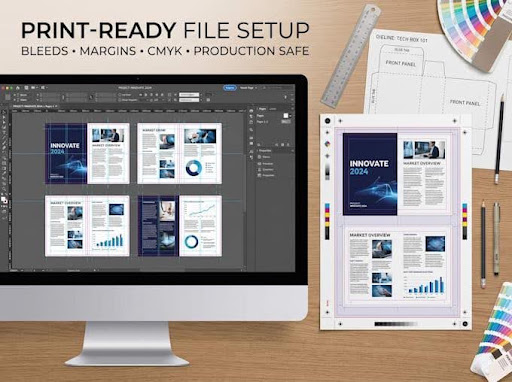
Use this checklist before you approve a bi-fold brochure:
- Flat size and finished folded size are confirmed.
- Portrait or landscape orientation is correct.
- The center-fold guide is in the correct position.
- The front cover and back panel are on the correct sides.
- Both inside panels read in the intended order.
- Bleed and safe margins follow the printer’s specifications.
- Text and essential images are clear of the fold.
- Images are sharp at their final printed size.
- Color mode and PDF export settings meet the printer’s requirements.
- Paper stock, coating and scoring have been confirmed.
- Spelling, contact details, QR codes and links have been checked.
- A proof has been reviewed before approving the production run.
Frequently Asked Questions About Bi Fold Brochures
1. What is a bi fold brochure?
A bi fold brochure is a single sheet folded once, usually down the center. Printing on both sides creates four panels: a front cover, a back panel and two inside panels.
2. What are the standard bi fold brochure sizes?
A common US format uses an 11 × 8.5-inch flat sheet and folds to 5.5 × 8.5 inches. Other sizes are available depending on the printer and the intended use.
3. What is the difference between bi-fold brochure dimensions in inches and millimeters?
They are two measurement systems for the same physical dimensions. For example, 11 × 8.5 inches is approximately 279.4 × 215.9 mm. Always use the exact dimensions required by the print provider.
4. How many panels does a bi fold brochure have?
A standard bi-fold has four printable panels when both sides of the sheet are printed. One fold creates two halves; printing on both sides gives four faces.
5. What is the difference between a bi-fold and a tri-fold brochure?
A bi-fold uses one fold and has four panels. A typical tri-fold uses two folds and has six panels. A bi-fold offers a wider inside spread, while a tri-fold divides information into more sections.
6. How do you design a bi fold brochure?
Start with the flat sheet dimensions, create the outside and inside spreads, place the fold guide at the midpoint and arrange the four panels in the correct reading order. Add the printer’s required bleed, use readable typography and keep important content away from the fold.
7. What paper is best for bi fold brochure printing?
The best paper depends on the purpose. Uncoated paper can suit informational materials, gloss can work well for colorful photography, and matte paper offers a less reflective appearance. Heavier stock may feel more premium but could need scoring.
8. What resolution should I use for a bi fold brochure?
For raster images, 300 DPI at the final printed size is a common recommendation. Vector elements such as properly exported text and logos can remain sharp without being treated as raster images. Follow the printer’s file specifications.
9. How much bleed is needed for a bi fold brochure?
A common commercial-printing specification is 0.125 inch, or 3.175 mm, on each outside edge. The required amount depends on the printer, so use its template whenever one is available.
10. How much does a bi fold brochure cost?
The price depends on quantity, dimensions, paper stock, color printing, coatings, scoring, proofing and delivery. Request a quote using the same specifications from each provider to compare costs accurately.
11. Can a bi fold brochure be used as a product packaging insert?
Yes. It can provide instructions, product information, brand details or a QR code. Choose the folded size based on the usable interior dimensions of the box and the space needed for the product.
12. Can I print a bi fold brochure in A4 size?
Yes, if your printer offers the format. An A4 sheet measuring 297 × 210 mm can fold to approximately A5 size. Confirm the orientation and final dimensions before creating the print file.
13. What should be included in a bi fold brochure?
Include a clear cover headline, relevant images, organized information inside, and useful contact details or a call to action on the back. The exact content should match the brochure’s purpose and audience.
14. Can a bi fold brochure be mailed without an envelope?
It may qualify as a folded self-mailer if it meets the applicable postal requirements for dimensions, thickness, paper, fold and sealing. Check the current USPS rules or consult your mail provider before printing.
Conclusion
A bi fold brochure is a practical format for presenting business information, product details and marketing messages in a compact, book-like design. Its four panels provide enough room for a strong cover, a useful inside spread and a back panel with contact information or a call to action.
To get the best result, select the right flat and folded dimensions first. Then plan the panel order, use readable typography, choose paper that suits the purpose and prepare the print file with the required bleed, safe margins and export settings. Review a folded proof before approving the final production run.
If your brochure will accompany a physical product, plan the insert and box together so the finished materials fit neatly and present a consistent brand experience. Explore Bluebird Packaging’s custom packaging options or request a custom packaging quote to discuss packaging needs. Confirm brochure-printing availability separately before placing an order.