

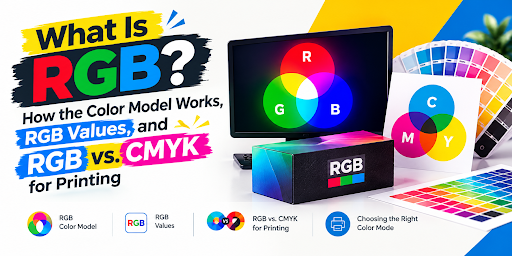
RGB is one of the most common color systems in digital design. It determines how colors appear on computer monitors, smartphones, televisions, websites, and other electronic displays. If you have ever selected a color in Photoshop, Canva, Illustrator, or a website color picker, you have probably encountered RGB values.
However, understanding RGB becomes especially important when a digital design needs to be printed on a physical product, such as a custom cardboard box, retail carton, label, or packaging insert. A color that looks bright on your monitor may appear different when reproduced with printing inks.
Quick answer: RGB stands for Red, Green, and Blue. It is an additive color model that creates colors by combining different intensities of red, green, and blue light. RGB is primarily used for digital screens and electronic images, while commercial packaging printing commonly uses CMYK process inks or additional spot colors.
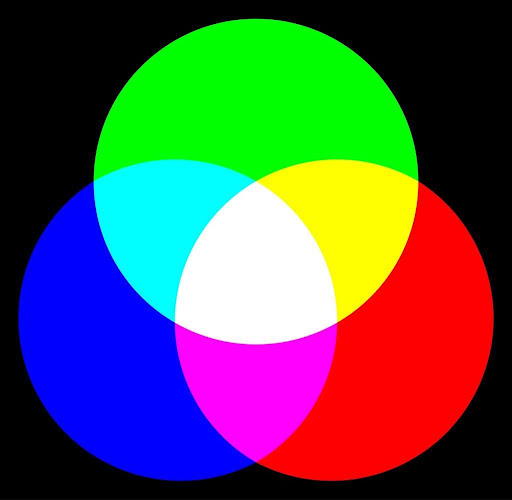
Understanding the RGB color model helps designers choose digital colors, interpret color codes, prepare artwork, and communicate more effectively with packaging suppliers.
What Does RGB Stand For?
RGB stands for Red, Green, and Blue. These are the three primary light channels used by the RGB color model.
A digital display controls the intensity of red, green, and blue light to reproduce a wide range of colors. By changing the intensity of each channel, a screen can display colors ranging from black to white, along with millions of colors in between.
For example:
- Red is represented by RGB (255, 0, 0).
- Green is represented by RGB (0, 255, 0).
- Blue is represented by RGB (0, 0, 255).
- White is represented by RGB (255, 255, 255).
- Black is represented by RGB (0, 0, 0).
In a standard 8-bit-per-channel RGB system, each channel can have 256 possible values, from 0 through 255. Combining all three channels produces 16,777,216 possible RGB combinations.
The actual colors you can see depend on the RGB color space, display capabilities, calibration, and viewing conditions.
What Is the RGB Color Model?
The RGB color model is a way of describing colors through three numerical components: red, green, and blue. Each component represents the intensity of its corresponding color channel.
RGB is called an additive color model because colors are created by adding light. It works differently from printing, where inks absorb portions of light reflected from a surface.
The RGB color model is used in many digital applications, including:
- Websites and web applications
- Mobile apps and user interfaces
- Digital advertisements and social media graphics
- Photography and image editing
- Video and digital presentations
- Computer monitors and television displays
- Digital illustrations and branding assets
RGB values are also used in design software to define brand colors and create consistent digital assets.
For example, a brand may specify a blue color as RGB (0, 86, 179). A designer can use that value in a digital mockup, website graphic, or other RGB-based design. If the same brand color must appear on printed packaging, a suitable print color specification should also be established.
For related packaging design considerations, see packaging design.
How Does RGB Work?
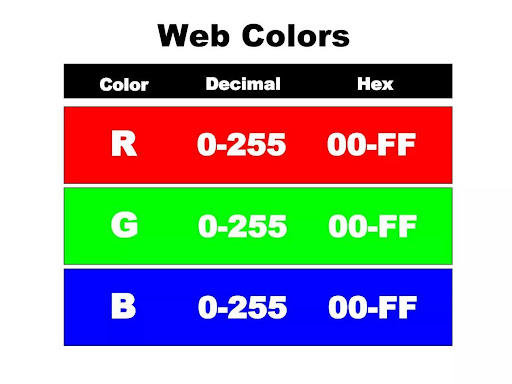
RGB works by combining different amounts of red, green, and blue light. Each channel contributes to the color that a display produces.
Imagine starting with a screen that emits no light. It appears black. As red, green, and blue light are added at different intensities, the resulting color changes.
Additive color mixing explained
| Light combination | Result |
|---|---|
| No red, green, or blue light | Black |
| Red + green light | Yellow |
| Green + blue light | Cyan |
| Blue + red light | Magenta |
| Red + green + blue at full intensity | White |
These combinations explain why RGB is different from traditional paint mixing. When light is added, the result becomes brighter. When the three channels are all at maximum intensity, the result is white.
Why do screens use red, green, and blue?
Human color vision responds to different wavelengths of light. RGB displays use three color channels to reproduce a wide variety of perceived colors by stimulating the visual system in different ways.
A display’s individual pixels contain red, green, and blue components or subpixels. Their intensities are controlled to create the colors that form images, text, and video.
The precise technology varies by display type, but the underlying RGB principle is central to conventional digital color reproduction.
RGB Color Values Explained
RGB color values describe the intensity of the red, green, and blue channels. In common 8-bit RGB workflows, each channel is assigned a value from 0 to 255.
The first number represents red, the second represents green, and the third represents blue.
For example, rgb(255, 0, 0) means full red intensity with no green or blue. In contrast, rgb(0, 0, 0) means that all three channels are at zero.
Common RGB color values and HEX codes
| Color | RGB value | HEX code |
|---|---|---|
| Red | rgb(255, 0, 0) |
#FF0000 |
| Green | rgb(0, 255, 0) |
#00FF00 |
| Blue | rgb(0, 0, 255) |
#0000FF |
| Yellow | rgb(255, 255, 0) |
#FFFF00 |
| Cyan | rgb(0, 255, 255) |
#00FFFF |
| Magenta | rgb(255, 0, 255) |
#FF00FF |
| White | rgb(255, 255, 255) |
#FFFFFF |
| Black | rgb(0, 0, 0) |
#000000 |
| Gray | rgb(128, 128, 128) |
#808080 |
| Orange | rgb(255, 165, 0) |
#FFA500 |
These values are useful reference points for digital design. They should not be treated as guaranteed printing formulas because a printed result depends on the print process, substrate, ink system, and color-management settings.
What do RGB numbers mean?
An RGB value describes the relative channel values within a defined RGB system. A higher channel value generally means a higher encoded intensity for that channel.
For example:
rgb(255, 0, 0)represents red.rgb(128, 0, 0)represents a darker red.rgb(255, 128, 0)represents an orange.rgb(0, 0, 128)represents a dark blue.
RGB numbers are not a universal measurement of physical brightness. Their appearance depends on the color space and the display rendering the color.
What Are RGB Color Codes?
RGB colors can be written in different formats, including RGB notation and hexadecimal color codes. Both formats can describe colors used in digital design.
RGB notation
RGB notation lists the three channel values in order:
rgb(255, 128, 0)This specifies red at 255, green at 128, and blue at 0 in a typical 8-bit representation.
HEX color codes
A HEX code expresses the same three channel values using hexadecimal notation. A common six-digit format is #RRGGBB.
RRrepresents the red channel.GGrepresents the green channel.BBrepresents the blue channel.
For example, #FF8000 corresponds to rgb(255, 128, 0).
HEX codes are widely used in website design, digital brand guidelines, and design tools. If your company maintains digital branding standards, record RGB and HEX values together to reduce ambiguity.
RGB, HEX, and CMYK compared
| Color format | What it describes | Common use |
|---|---|---|
| RGB | Red, green, and blue channel values | Digital graphics and displays |
| HEX | RGB values written in hexadecimal | Websites, UI design, digital brand assets |
| CMYK | Cyan, magenta, yellow, and black ink components | Many commercial printing workflows |
| HSL | Hue, saturation, and lightness | Color selection and adjustment |
| Pantone or another spot-color system | A specified named ink color | Brand-color matching and specialty printing |
These formats are related, but they are not interchangeable in every workflow. RGB and HEX are commonly used for screens; CMYK and spot-color specifications help communicate requirements for printing.
What Is RGB Color Mode?
RGB color mode describes an image or document using red, green, and blue channels. It is widely used in software for digital illustration, photography, web design, and screen-based content.
When creating digital artwork, RGB is generally appropriate for:
- Websites and online stores
- Social media posts
- Digital advertisements
- Product photos for e-commerce
- Presentations and video content
- Digital packaging mockups
A packaging mockup viewed on a screen is still a digital representation. Its colors may not precisely match the final physical package.
When preparing artwork for commercial printing, follow the packaging supplier’s specifications. Depending on the printer, workflow, and printing method, the supplier may request a CMYK file, a specific color profile, or defined spot colors.
Learn more about packaging artwork and packaging mockups.
What Is an RGB Color Space?
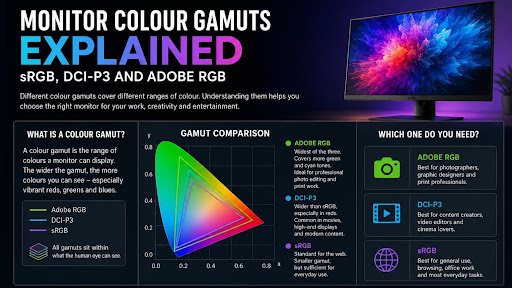
An RGB color space defines how numerical RGB values correspond to actual colors. Without a defined color space, the same RGB numbers can look different across devices.
A color space specifies characteristics such as its red, green, and blue primaries and white point. This helps software and compatible displays interpret color values more consistently.
Common RGB color spaces
| Color space | Typical use | What to know |
|---|---|---|
| sRGB | Web graphics, websites, general digital content | A common default for web-oriented assets |
| Adobe RGB (1998) | Photography and selected professional imaging workflows | Can represent a wider range of some green and cyan colors than sRGB |
| Display P3 | Compatible modern displays and digital workflows | Covers a wider color gamut than sRGB in many areas |
| Rec. 2020 RGB | Certain high-definition and wide-gamut video workflows | Defines a broad color gamut for compatible systems |
A wider-gamut color space can represent colors outside sRGB, but that does not mean every display can reproduce them. The device, software, file profile, and output settings all affect the result.
For most general-purpose website graphics, sRGB is a practical choice unless the platform or workflow specifies otherwise.
For packaging artwork, do not assume that choosing Adobe RGB or Display P3 will make printed colors more vivid. The final result must be evaluated in the context of the printing process and its supported color gamut.
RGB vs. CMYK: What Is the Difference?
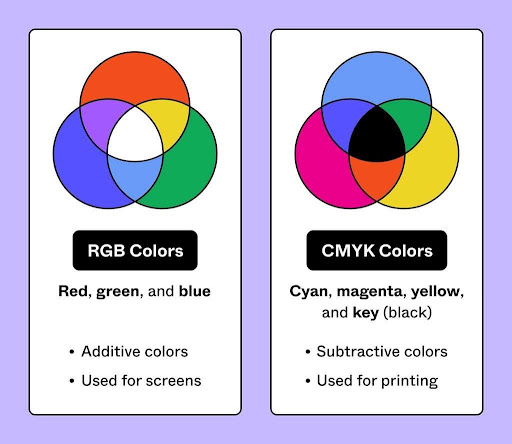
RGB and CMYK are two different color models used for different purposes.
RGB creates colors by adding light. CMYK creates printed colors using cyan, magenta, yellow, and black inks or toners that absorb portions of light reflected from the printing surface.
RGB vs. CMYK comparison table
| Feature | RGB | CMYK |
|---|---|---|
| Full form | Red, Green, Blue | Cyan, Magenta, Yellow, Key (Black) |
| Color method | Additive light mixing | Subtractive ink mixing |
| Typical output | Screens and digital displays | Many commercial print jobs |
| Black | All RGB channels at zero | Created using black ink, sometimes combined with other inks |
| White | All RGB channels at full intensity | Usually the unprinted substrate or its base color |
| Common applications | Websites, apps, photos, digital graphics | Packaging, brochures, cartons, labels, and other print products |
| Important limitation | Appearance depends on display and color space | Reproducible colors depend on inks, substrate, and print conditions |
Why do RGB and CMYK produce different colors?
A screen produces light, while a printed surface reflects light. That fundamental difference means the two systems cannot reproduce every color identically.
RGB can represent some highly saturated colors that a particular CMYK printing process cannot reproduce. When such a color is converted into the printable range, the software or color-management system must map it to a color that the output process can produce.
This can make a vivid blue, green, orange, or other saturated color appear less intense in print.
However, the exact change is not the same for every color. It depends on the RGB color space, output profile, printing process, substrate, and color-management settings.
For a packaging project, see this guide to RGB vs. CMYK for packaging.
Why Do RGB Colors Look Different When Printed on Packaging?

A logo may look bright and consistent on a laptop but appear darker or less saturated on a printed box. This does not necessarily mean that the artwork was printed incorrectly. The difference may arise because the screen and print process have different color capabilities.
Several factors can influence the final appearance.
1. RGB colors may be outside the printable gamut
Some RGB colors cannot be reproduced exactly with the inks used for a particular print job. Color conversion maps them to available printable colors.
2. The packaging material affects appearance
White coated board, uncoated paperboard, Kraft board, and laminated surfaces do not reflect light in the same way. Even when similar ink values are used, the material can influence the appearance of the finished color.
3. Printing methods have different capabilities
Digital printing, offset printing, and other processes may use different inks, profiles, and production settings. The appropriate artwork setup should be confirmed with the supplier rather than assumed to be identical for every method.
Compare offset vs. digital printing for packaging when choosing a printing workflow.
4. Screens are not all calibrated alike
Brightness, color temperature, display gamut, and calibration can change how a color looks on different screens. A design approved on one monitor may not appear identical on another.
5. Finishes can change the visual result
Gloss coatings, matte lamination, and other surface treatments may affect perceived color, contrast, and reflectivity. Evaluate the finish as part of the final packaging design.
Explore packaging finishes when planning a custom printed box.
How to Convert RGB to CMYK for Printing
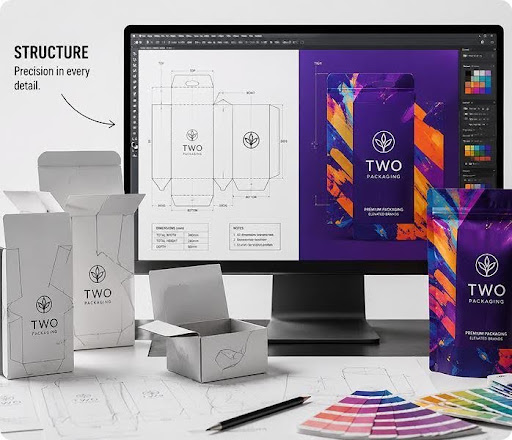
RGB-to-CMYK conversion prepares color data for a CMYK print workflow. However, there is no single universal conversion that guarantees an exact visual match for every printing process.
For the most reliable result, use the output profile and file-preparation requirements supplied by your printer or packaging manufacturer.
Step 1: Confirm the printer’s requirements
Ask whether the supplier needs CMYK artwork, a specific ICC profile, spot-color references, or another file setup. Do not convert a file without understanding the intended output conditions.
Step 2: Keep the original RGB artwork
Save an editable copy of the original file before converting it. This gives you a reference for digital use and makes it easier to revise the design later.
Step 3: Convert using the correct color profile
Use suitable design software and the profile recommended for the intended printing process. The software’s conversion settings affect how colors are mapped into the available print gamut.
Step 4: Check colors that may shift
Review highly saturated blues, greens, oranges, and other prominent brand colors. These may need special attention if their appearance changes significantly during conversion.
Step 5: Use a proof or color reference
Review a color-managed proof or physical sample where appropriate. For important brand colors, ask the printer whether a suitable spot-color ink or another production approach is available.
Step 6: Approve the actual packaging specifications
Before production, verify the artwork, dimensions, material, print method, finishes, and color references. A digital mockup is useful for layout review, but it is not a guarantee of exact printed color.
For further preparation, see custom packaging design and custom box design.
How to Keep Brand Colors Consistent Across Digital and Printed Packaging
Brands often use the same logo on websites, social media, advertisements, printed labels, and physical boxes. Maintaining consistency requires more than recording one RGB number.
Create a color specification that identifies the intended color for each output method.
A practical brand-color checklist
- Record the approved HEX and RGB values for digital use.
- Specify the intended CMYK values or print profile for process printing.
- Include a Pantone or other spot-color reference when exact brand-color matching is required and available.
- Identify the intended packaging material and finish.
- Request a proof or physical sample for important colors.
- Keep the approved artwork and color specifications for repeat orders.
A spot color may help reproduce a specific brand color more consistently, but the result still depends on the ink, substrate, finish, and printing conditions. Discuss expectations with the print supplier before production.
For more information, explore Pantone colors for packaging and custom printed packaging.
When Should You Use RGB, and When Should You Use CMYK?
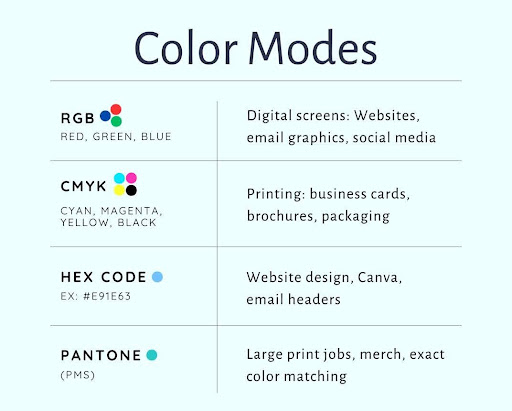
The right color mode depends on where the design will be viewed or reproduced.
| Project | Typical choice | Reason |
|---|---|---|
| Website or online store graphics | RGB, commonly sRGB | Designed for screens |
| Social media posts and digital ads | RGB, commonly sRGB | Digital display output |
| Product photos for online listings | RGB, commonly sRGB | Digital image workflows |
| Mobile apps and user interfaces | RGB-based digital color | Screen presentation |
| Commercially printed boxes | Follow the printer’s required setup; often CMYK or spot colors | Ink-based production |
| Printed brochures and catalogs | Follow the printer’s specifications; often CMYK | Commercial print workflow |
| Packaging with exact brand-color requirements | CMYK and/or an agreed spot-color specification | Helps define the intended print result |
A home or office printer may accept RGB files and perform its own conversion. Commercial packaging suppliers may have different file requirements, so always follow the specifications for the actual job.
Common RGB Mistakes to Avoid
Mistake 1: Assuming RGB and CMYK are interchangeable
They describe color differently and serve different output processes. Converting between them can change appearance.
Mistake 2: Assuming every screen displays the same color
Different displays can reproduce different color ranges and may be configured differently. Use color-managed workflows when accurate comparison matters.
Mistake 3: Choosing packaging colors only from a monitor
A screen mockup helps visualize a design, but a physical proof or sample is more useful when evaluating how a color appears on the intended material.
Mistake 4: Using a generic CMYK conversion for every printer
Different print processes and substrates can require different output settings. Use the supplier’s specifications.
Mistake 5: Forgetting the substrate and finish
Kraft board, white paperboard, coated materials, and different finishes can influence the perceived result. Specify the actual packaging construction when reviewing color.
Mistake 6: Keeping only RGB values in the brand guide
Record the appropriate specifications for digital and printed uses. If exact brand matching matters, agree on the print reference with your supplier.
Mistake 7: Approving artwork without checking the final file
Review the dieline, bleed, safe areas, color settings, images, text, and other production requirements before approving the job.
For help with box layouts, review the packaging dieline guide.
Frequently Asked Questions About RGB
1. What is RGB in simple words?
RGB stands for Red, Green, and Blue. It is a color model that combines different intensities of red, green, and blue light to create colors on digital displays.
2. What does RGB stand for in design?
In design, RGB means Red, Green, and Blue. Designers use RGB values to specify colors for websites, digital artwork, photos, app interfaces, and other screen-based projects.
3. What is the RGB color model used for?
The RGB color model is used primarily for digital color reproduction, including computer displays, mobile screens, websites, digital graphics, photography, and video.
4. Why does RGB use red, green, and blue?
RGB uses three light channels that can be combined at different intensities to reproduce a broad range of perceived colors on electronic displays.
5. How many colors can RGB represent?
Standard 24-bit RGB has 8 bits for each of its three channels. That gives 256 possible values per channel and 16,777,216 possible channel combinations. The number of colors a device can actually display depends on its capabilities and color space.
6. What is the difference between RGB and HEX?
RGB typically represents color with three channel values, such as rgb(255, 0, 0). HEX represents the same type of RGB color using hexadecimal notation, such as #FF0000.
7. Is RGB better than CMYK?
Neither is universally better. RGB is suitable for digital displays, while CMYK is commonly used in commercial printing. The right choice depends on the final output and the requirements of the production workflow.
8. Why do RGB colors look dull when printed?
Some RGB colors fall outside the range that a particular printing process can reproduce. Conversion to printable colors, the material, the inks, and the finish can all influence the final appearance.
9. Should packaging artwork be RGB or CMYK?
Follow the packaging printer’s specifications. Many commercial packaging workflows use CMYK or a combination of CMYK and spot colors, but requirements vary by process and supplier.
10. Can RGB colors be converted perfectly to CMYK?
Not always. Some RGB colors cannot be reproduced exactly by a given CMYK printing process. A suitable color profile and proofing process can help manage the difference, but an exact match is not guaranteed.
11. What is the best RGB color space for websites?
sRGB is a common, practical default for general web graphics because it is widely supported. Other color spaces may be appropriate for specific modern display workflows, but their use should be planned with the intended platform in mind.
12. How can I maintain consistent colors on printed boxes?
Record the approved digital color values and the agreed print specifications. Tell the packaging supplier about the material and finish, request a proof or sample for important colors, and approve the production artwork before printing.
Final Thoughts: Understand RGB Before Preparing Print Artwork
RGB is fundamental to digital design because it describes colors through red, green, and blue light. Understanding RGB values, HEX codes, and color spaces helps designers create consistent digital artwork and communicate color choices more clearly.
When that artwork moves into commercial packaging production, the output process matters. RGB and CMYK do not reproduce every color identically, and the printed result also depends on the material, ink system, printing method, and finish.
For branded packaging, plan the digital design and print specifications together. Confirm the supplier’s file requirements, review proofs or samples where appropriate, and document important brand colors for future orders.
If you are preparing artwork for custom boxes, explore custom packaging, review cardboard box options, or request a packaging quote to discuss your packaging requirements.